A Beginner’s Guide to Local SEO for Small Businesses

Some of the links on this website are affiliate links. This means a commission may be earned if you click through and make a purchase, at no extra cost to you.
If you’re a web designer, photographer, or copywriter, you’ve probably relied on word-of-mouth or social media for most of your leads.
But there’s another channel you could be using – local SEO.
It’s the quiet, reliable way to get discovered by clients who are looking for what you do.
This guide will walk you through the basics of local SEO in simple, easy-to-follow steps. By the end, you’ll have a better understanding of how to make your business more visible to potential customers.
What is local SEO?
Local SEO is the process of optimising your online presence so that your business appears in local search results. When someone searches for a service or product in your area, like “web design manchester,” local SEO helps ensure your business shows up in the results.
How is local SEO different from general SEO?
General SEO aims to improve visibility on a national or global scale. Local SEO narrows the focus to people searching within your area.
While general SEO covers things like keywords, backlinks, and site structure, local SEO adds location-based tactics — optimising your Google Business Profile, managing reviews, and keeping your name, address, and phone number (NAP) consistent across directories and your website.
Those local signals help Google understand where you are and who you serve.
Why is local SEO important?
Local SEO is important because it targets customers who are close to your business. These are the people most likely to book your services or call for more information. It’s all about reaching the right people at the right time.
What local SEO looks like in action
So, what does local SEO actually look like to your potential clients?
Here’s an example of a typical local SEO search results page. This one’s for the phrase “web design manchester”.
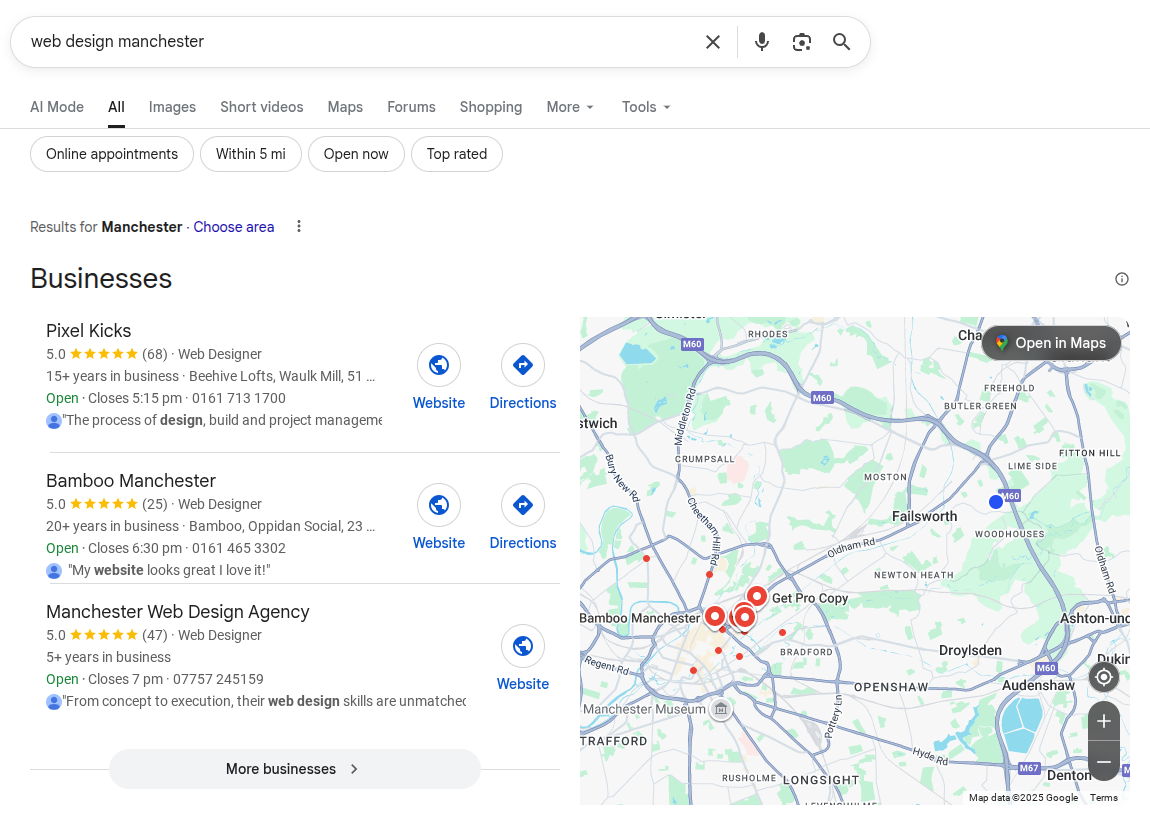
This is what’s known as the Local Pack.
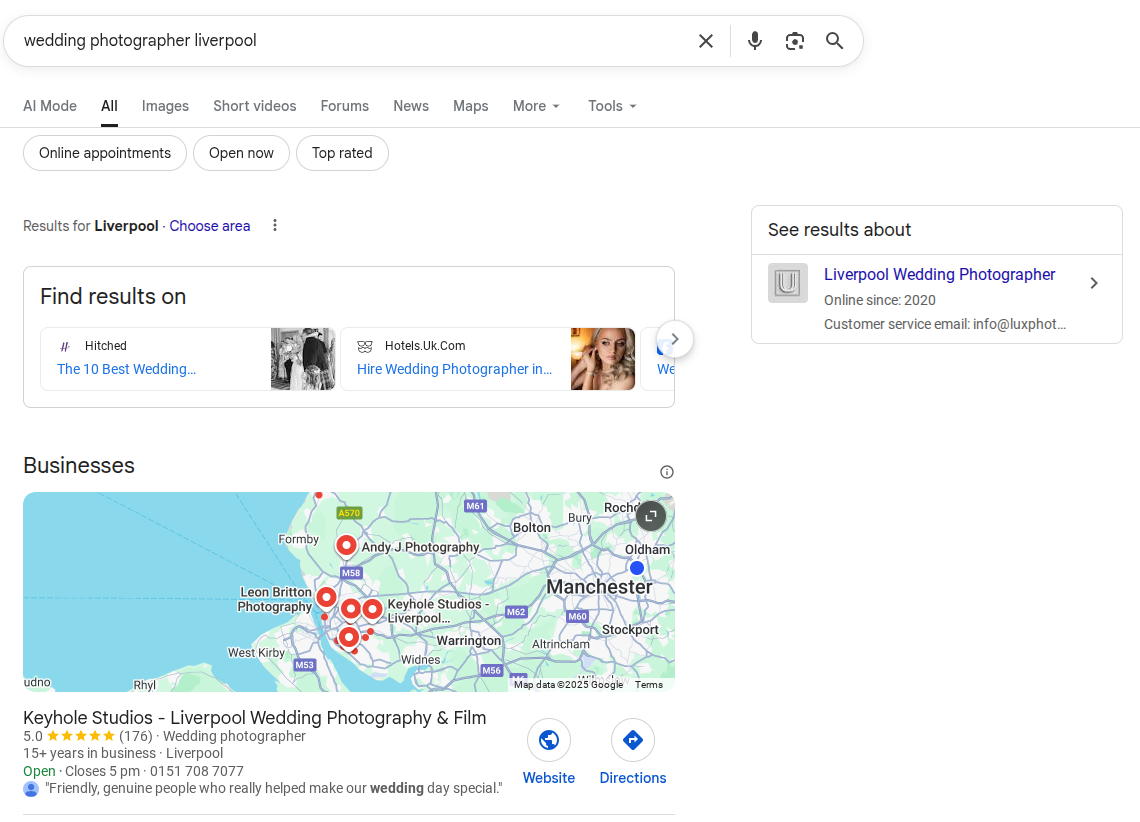
And here’s a variation of the same, which includes local citations in the widget area above the map.
And here’s a variation of another layout you’re likely to see when searching for local services. This one’s for “party catering manchester”.
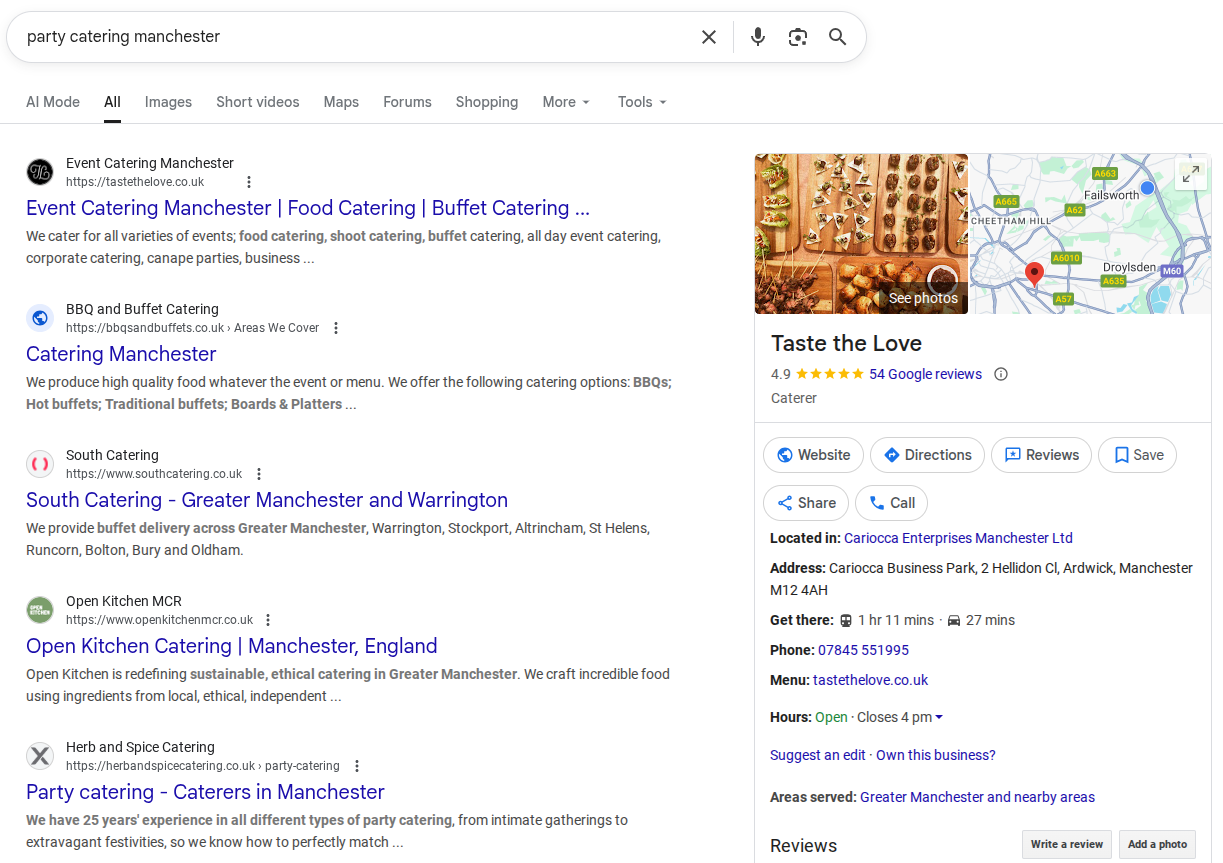
All of these screenshots have been taken from a laptop. The layout on your phone will be different again.
So, why doesn’t Google standardise these layouts?
In short, Google continually tests and tweaks local results, tailoring them to each user’s intent and what its data suggests will deliver the best experience.
And if you search directly in Google Maps, you’ll often see an even richer local experience — with pins, routes, and reviews front and centre. Those results can differ from standard Google Search because Maps uses its own ranking signals, giving extra weight to proximity and customer feedback.
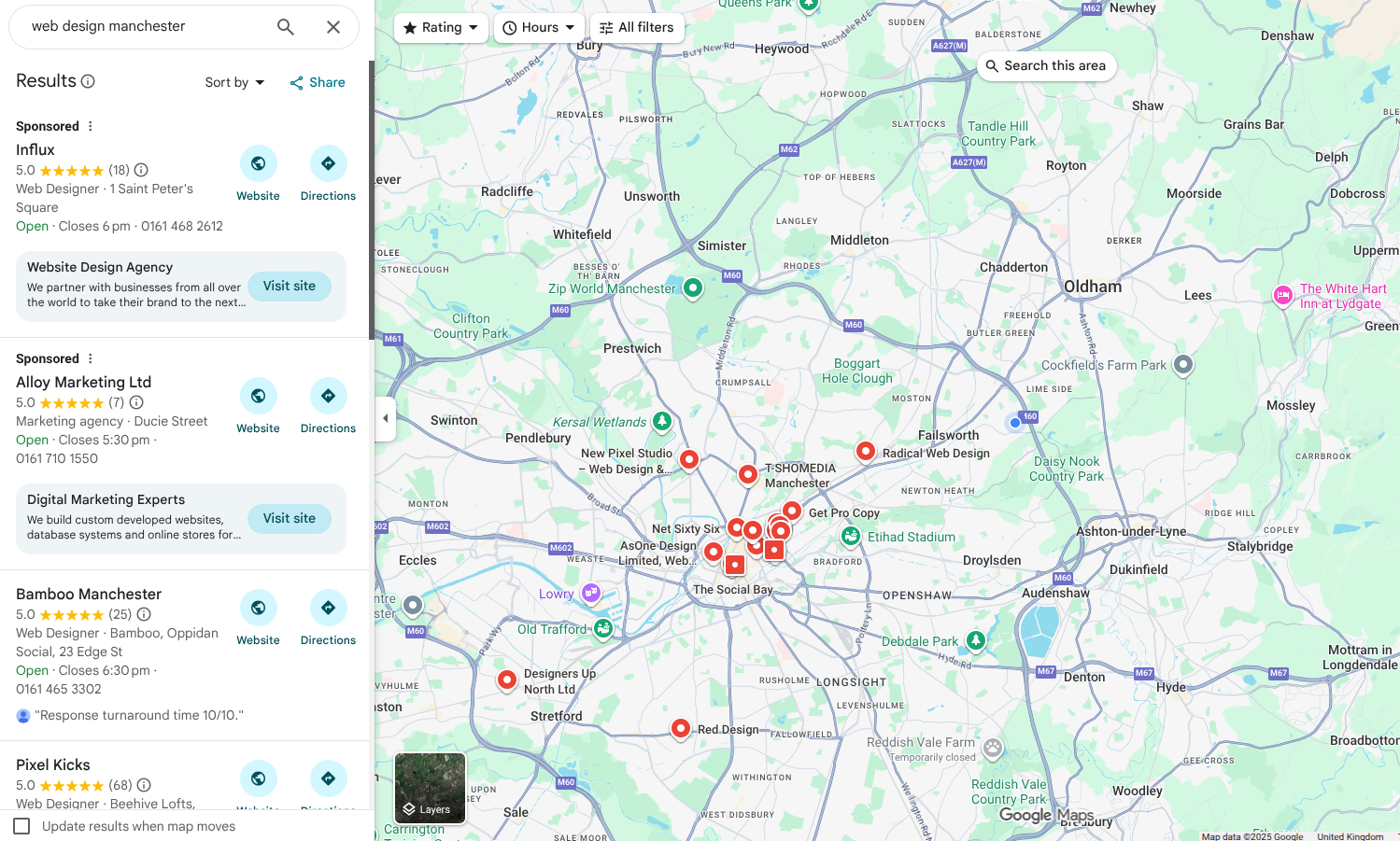
Optimising your site for local SEO will help your business show up in these places when someone nearby searches for your product or service. Paid ads can help you get seen fast, but a well-optimised Google Business Profile and website will keep you visible in the long run.
How businesses get listed in local search results
Now that you’ve seen where local search results appear, the next question is: how does your business get listed there?
Each part of the page pulls information from different sources:
- Sponsored listings come from Google Ads or Local Services Ads, which businesses pay to appear in. You can switch these on any time by creating a Google Ads account and targeting your local area.
- The map listings and Local Pack are powered by Google Business Profiles. These are free to set up and are essential if you want your business to appear in Maps and local search results.
- Website results underneath the map come from organic SEO. Google finds and ranks pages on your website that match what the user searched for, especially if your content includes local keywords and location information.
- Citations and mentions come from business directories, local news sites, and other websites that include your business name, address, and phone number. They help Google confirm your legitimacy and location.
In short, you’re not listed in just one place — your business information is pulled from several connected sources. Setting these up properly gives Google more confidence in your business, which increases your chances of appearing everywhere your potential clients are looking.
Now let’s start with the most important one: your Google Business Profile.
How Google decides which businesses to show first
Once your business is listed, Google still needs to decide which ones appear at the top. That decision is based on three key factors: proximity, relevance, and prominence.
Proximity
Google looks at how close a business is to the person searching. If someone in central Manchester types “website designer near me,” Google will prioritise listings physically (or service-area) closer to that location.
You can’t control where people search from, but you can help by clearly defining your service areas and keeping your address details up to date.
A service area is the region or set of locations where you’re happy to take on clients. If you work from home or don’t want unexpected visitors, you can choose to hide your physical address in your Google Business Profile and list your city or region instead.
For example, at Medlock Web we use a service area because we don’t meet clients at our home office — we work remotely with local businesses and prefer enquiries to come through our website rather than off-the-cuff drop-ins.
Relevance
Relevance means how well your business matches what the searcher is looking for. This comes down to accurate categories, keywords, and descriptions. A photographer who includes “brand photography” or “portrait sessions” in their profile and website should appear for those specific searches.
Prominence
Prominence reflects how well-known or trusted your business is online. It’s influenced by the number and quality of reviews, backlinks from other sites, local media mentions, and general website authority. A business that’s active online, regularly reviewed, and mentioned on credible local websites will usually rank higher.
You can’t control everything Google does, but you can strengthen all three factors by keeping your details accurate, creating high-quality content, and building a trustworthy presence across the web.
Claim and optimise your business profile on Google
Creating a business profile on Google is an essential part of the local SEO process. Without a profile, your business won’t show up in Google Search or on Google Maps. And the good news, for some businesses, is that you don’t need a website to have a Google Business Profile.
Here’s how to get started:
- Claim your business: Go to the Google Business website and sign in with your Google account. Follow the prompts to claim your business. If your business isn’t listed, you can add it.
- Fill out your profile completely: Provide accurate information, including your business name, address, phone number, website and hours of operation. The more complete your profile, the better.
- Add photos: Upload high-quality photos of your business, products, or services. This makes your profile more attractive to potential customers. Some experts recommend doing this at least two or three times a week to boost your rankings.
- Encourage reviews: Ask happy customers to leave a review on your Google Business Profile page. Positive reviews can boost your rankings. We’ve got a guide on how to get reviews on your Google Business Profile.
Optimise your website for local search
Your website needs to be optimised for local keywords, which are words or phrases people use when looking for services in your area. Here’s how:
- Include local keywords: Use keywords that include your location, like “Manchester bakery” or “Cardiff hair salon.” Place these in your page titles, headings and throughout your content.
- Create location-specific pages: If your business serves multiple areas, create separate pages for each location. This helps you rank for searches in those specific areas.
- Add a map to your website: Embedding a Google Map on your contact or homepage can help improve your local SEO.
Get listed in online directories
Online directories like Yelp, Bing Places, and Yell are important for local SEO. Make sure your business is listed in these directories:
- Find relevant directories: Search for online directories that are popular in your industry. For example, a restaurant might list on TripAdvisor or Zomato.
- Keep information consistent: Ensure your business name, address and phone number (NAP) are consistent across all directories. Inconsistencies can hurt your rankings.
Build local backlinks
Backlinks are links from other websites to your site. Local backlinks from other businesses, local blogs, or news sites can improve your local SEO:
- Partner with local businesses: Collaborate with nearby businesses to exchange links. For example, if you’re a florist, you could exchange links with a local wedding planner.
- Get featured in local media: Reach out to local newspapers, blogs or radio stations. If they write about your business, they might include a link to your website.
Create content relevant to your local area
Create content that speaks directly to your local audience. This can boost your local rankings. Here’s what you can do:
- Write blog posts about local events: If there’s a festival or event in your area, write about it. This shows you’re active in the community and helps attract local readers. Blog formatting helps your posts become more readable. Avoid large blocks of text and make your posts scannable.
- Highlight local news or trends: Discuss local trends related to your business. For instance, if you own a fitness centre, you could write about popular local hiking trails.
Use social media to engage locally
Social media platforms like Facebook, Instagram, and Twitter are great for connecting with your local audience. However, managing accounts on multiple platforms can become time consuming if your business is just you or a small team.
For this reason, it’s often best to choose one platform and do that one well before shifting focus to another one.
- Share local content: Post about local events, news or stories. This helps you engage with your community and gain followers.
- Use location tags: When posting on social media, use location tags to reach people in your area.
- Engage with local followers: Respond to comments, messages and reviews. Engaging with your local audience builds trust and loyalty.
Recommended tools for local SEO
- Google Business: Essential for managing your online presence on Google.
- Moz Local: Helps manage your business listings across multiple directories.
- SEMrush: Offers tools for keyword research, backlink analysis and tracking your local SEO performance.
Final tips
- Monitor your progress: Use tools like Google Analytics and Google Search Console to track how well your local SEO efforts are working.
- Be patient: Local SEO takes time, but the results are worth it. Stay consistent and keep optimising.
- Stay updated: SEO best practices can change, so stay informed about the latest trends and updates.
By following these steps, you’ll be on your way to improving your local SEO and attracting more customers from your area. Remember, the key is to stay consistent and keep refining your strategy as you learn what works best for your business.
Local SEO is one of the most effective ways to bring in new local customers.
If you’d rather skip the learning curve, find out how our local SEO service works and start improving your visibility on Google.
Photo by Tim Mossholder
Join the Medlock Web Community
Fortnightly advice for small business owners who want more traffic, more leads, and more visibility online. Practical tips on local SEO, Google Business Profile, and getting your website working harder — straight to your inbox every two weeks. No jargon, no spam, unsubscribe any time.